Put your brand in your buyers' LinkedIn conversations.
Junior finds relevant posts from your target accounts, comments as your company page or as you, in your voice, and brings every reply into one inbox for follow-up.
Enterprise: 14 days free, then $99/month. Card required. Cancel anytime.
Desktop app for Windows and Mac. Company-page commenting needs LinkedIn page admin access. Just commenting as yourself? See individual plans.
Junior's own results, from the Junior app as of September 26, 2026. Your results will depend on your market, targets and settings.
Junior does the daily commenting. Your team takes the conversations.
Show up where buyers already talk, without anyone scrolling LinkedIn for an hour a day.
-
Load your account list
Import target companies and people by CSV, tier them, or set the industries and topics your buyers care about.
-
Junior finds the right posts
It reads your target accounts' company pages and searches LinkedIn, scoring each post for relevance before it engages.
-
It comments as your brand
Comments use your brand voice and bio, with identity checks so a brand comment never posts under a personal name.
-
Replies land in one inbox
Junior drafts a response to every reply. Send it in a click, let auto-reply handle it, or hand it to a rep.
Everything you need to turn LinkedIn engagement into pipeline
Built for B2B teams, founders and agencies who sell to other businesses.
Your brand in the conversation, safely
Junior comments as your LinkedIn company page, so your brand stays visible on the accounts you're chasing without anyone managing the page by hand.
- Company comments use your brand voice and bio, with an optional "we/our" opener.
- Identity checks on every comment, so a brand comment never goes out under someone's personal name.
- Junior returns to key company pages every few hours and adds reactions after brand comments.
- Comment as the company page or as yourself, from the same plan.
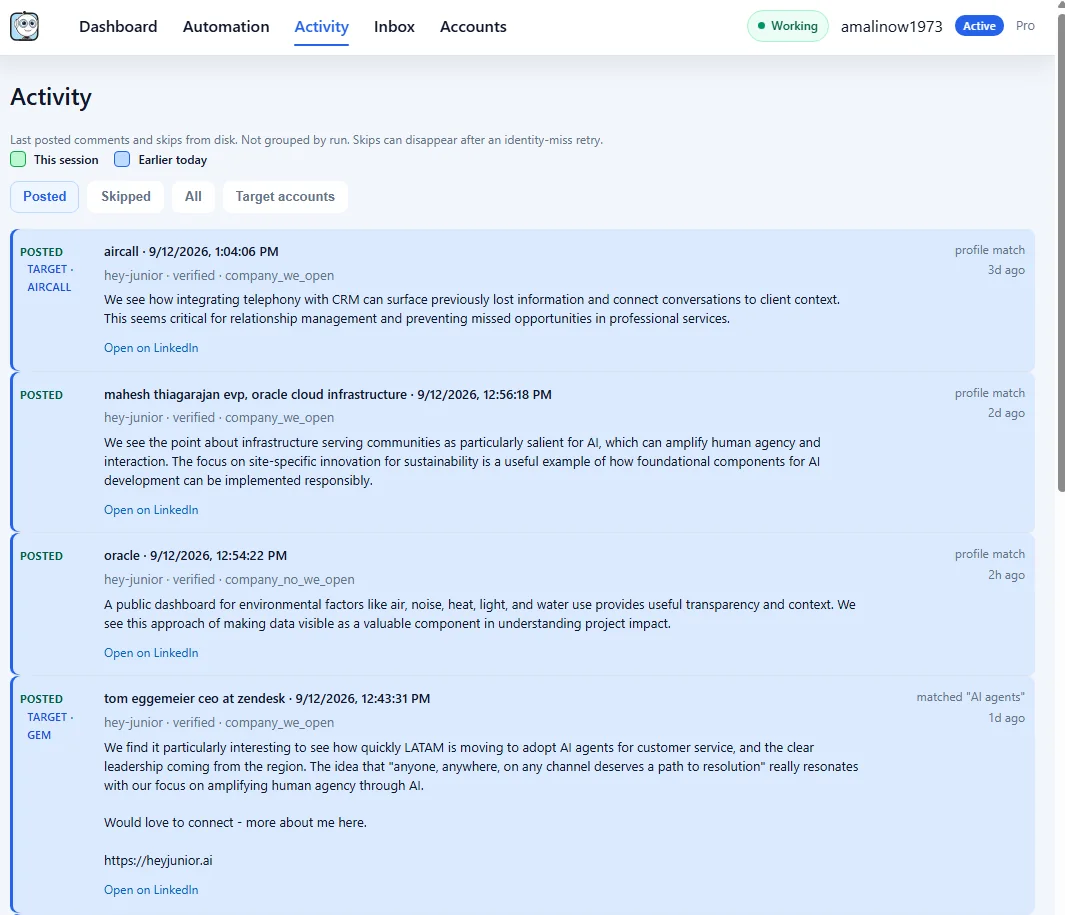
Focus on the logos you're chasing
Import your account list and Junior prioritizes their posts, so social selling supports your account plan instead of random scrolling.
- Add companies and people by hand or by CSV, and tier them.
- A timeline for every account shows each comment Junior made there.
- Each comment records who it was for, with a direct link to follow up.

Never lose a reply again
Every reply and mention lands in one inbox, grouped by post and person, with the next step already drafted.
- AI-drafted replies that use the original post and the full thread.
- Optional auto-reply, so hot conversations get an answer even on busy days.
- Filters for needs reply, high priority, target accounts and handoffs.
- Snooze a thread and it comes back when the prospect replies again.

Goal-driven writing
Set a goal such as finding customers or partnerships and choose a standard or more natural style, so comments aim at business outcomes and sound human.
Run Insights
See what Junior engaged with, what it skipped and why, with one-click suggestions such as dropping keywords that underperform.
Numbers you can report
Dashboards count only comments LinkedIn verified, plus replies, reactions and connection requests, so reporting to leadership holds up.
What happens after the first run
"It immediately cut down the onslaught of corporate-AI generated content and opened up a floodgate of the posts and comments from other humans that I needed to connect with. Within a few weeks of using it I can attest to a significant increase of connections and conversations that otherwise just would not have happened."Dmitri Kozlovski, PMPProject manager, consulting, healthcare and life sciences · public LinkedIn comment · view screenshot
One plan for your company page and your team
Free for 14 days. You won't be charged until the trial ends, and you can cancel anytime.
Enterprise
Comment as your LinkedIn company page or as you, on the accounts that matter, with every reply in one inbox.
- Comment as your company page, with identity checks
- Up to 80 comments a day
- Replies inbox with AI-drafted replies and auto-reply
- Target accounts, account timelines and Run Insights
- Priority support and help with setup
14 days free, then $99/month. Card required, $0 today. Setup takes about five minutes and needs admin access to your LinkedIn company page.
Teammates who only comment as themselves can use an individual plan from $14.99. Running Junior for clients? See Junior for agencies.
Questions teams ask before they start
What do I need to comment as our company page?
Admin access to the LinkedIn company page, the Enterprise plan and the Junior desktop app. Junior checks the identity on every comment so a brand comment never posts under a personal name, and it can still comment as you too.
Does Junior need our LinkedIn password?
No. Junior runs on your computer. You sign in to LinkedIn in a browser on your own machine, and your session stays there. See our Privacy Policy.
Do we approve comments before they post?
No. Junior posts automatically within your settings and the daily limit you choose. Every posted and skipped comment shows up in the Activity tab with a link to LinkedIn, so you can review it and edit or delete it there.
Is any LinkedIn automation completely risk-free?
No. LinkedIn can restrict automated activity and its rules can change. Junior is designed around local execution, conservative pacing and visible activity, but no product can honestly promise zero risk. See our Terms of Service.
Your next customer is already talking on LinkedIn.
Let Junior join the conversation as your company and your team. Try Enterprise free for 14 days.